• VEXcode Robotics Logo VEX Robotics Logo
  • VEX API Home Button VEX API Home Button
  • VEX 123 logo in purple VEX 123 logo in white
  • VEX GO logo in lime green VEX GO logo in white
  • VEXcode AIM logo in blue VEXcode AIM logo in white
  • VEX IQ logo in blue VEX IQ logo in white
  • VEX EXP logo in red VEX EXP logo in white
  • VEX V5 logo in red VEX V5 logo in white
  • VEX CTE logo in green VEX CTE logo in white
  • VEX AIR logo in orange VEX AIR logo in white
  • VEXcode VR logo in gold VEXcode VR logo in white
Μετάβαση στο κύριο περιεχόμενο
Ctrl+K

< Back to Platform Select

  • VEX AIM
  • Εκπαιδευτικά σεμινάρια VEXcode
  • Σύνδεση με ενσύρματη σύνδεση (Mac)
Ελληνικά
  • English
  • Español
  • 简体中文
  • VEXcode Robotics Logo

Πλοήγηση ενότητας

  • Μπλοκ
  • Πύθων
  • Εκπαιδευτικά σεμινάρια VEXcode
    • Connecting with a Wireless Connection (Web)
    • Σύνδεση με ασύρματη σύνδεση (Εφαρμογή)
    • Δημιουργία, Άνοιγμα και Αποθήκευση Έργου
    • Λήψη, εκτέλεση και διακοπή ενός έργου
    • Ονομάζοντας το Ρομπότ
    • Σύνδεση με ενσύρματη σύνδεση (Εφαρμογή)
    • Σύνδεση με ενσύρματη σύνδεση (Mac)
    • Σύνδεση με ενσύρματη σύνδεση (Windows)
    • Σύνδεση δύο ρομπότ
    • Ρύθμιση παραμέτρων υπογραφών χρώματος
    • Ρύθμιση κωδικών χρωμάτων
  • WebSocket

Πλοήγηση πλατφόρμας

  • VEX 123 logo in purple VEX 123 logo in white
  • VEX GO logo in lime green VEX GO logo in white
  • VEXcode AIM logo in blue VEXcode AIM logo in white
  • VEX IQ logo in blue VEX IQ logo in white
  • VEX EXP logo in red VEX EXP logo in white
  • VEX V5 logo in red VEX V5 logo in white
  • VEX CTE logo in green VEX CTE logo in white
  • VEX AIR logo in orange VEX AIR logo in white
  • VEXcode VR logo in gold VEXcode VR logo in white

Σύνδεση με ενσύρματη σύνδεση (Mac)#

  • Plug in the cable

  • Select the Robot icon in the top-right corner

  • Select Connect via USB from the menu

  • Follow the device prompts

  • Pick the right connection option

  • Finalize your connections

  • You are connected

Follow these simple steps to connect your VEX AIM Coding Robot to your computer with a USB-C cable.

Plug in the cable#

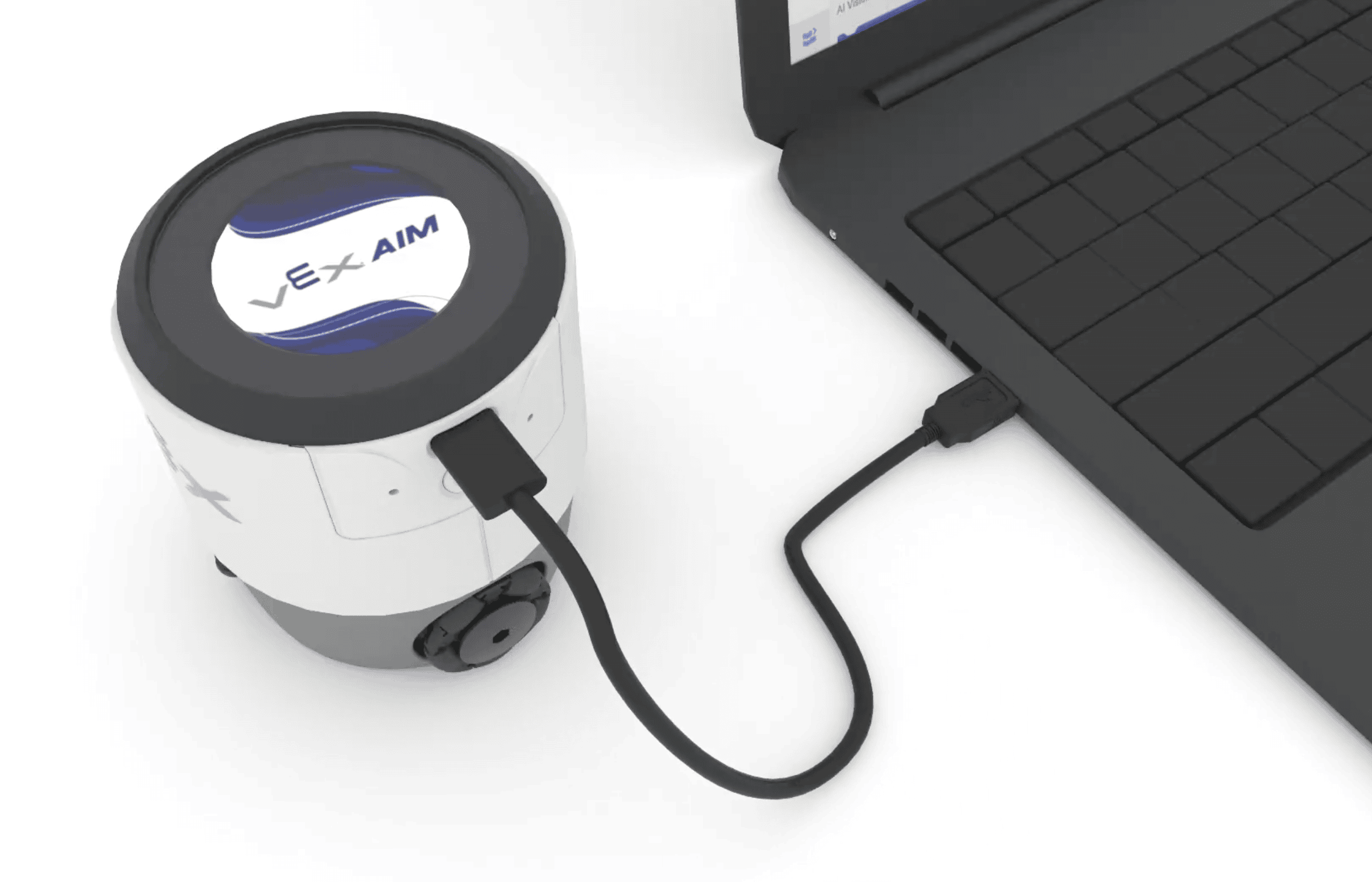
  • Use a USB-C cable to connect your robot to your computer.

  • The robot will turn on by itself.

Ρομπότ AIM στα αριστερά ενός φορητού υπολογιστή με ένα καλώδιο που συνδέει τα δύο ηλεκτρονικά μέρη.

Select the Robot icon in the top-right corner#

Screenshot of the upper right hand corner of the VEXcode AIM Toolbar, with the white Robot icon highlighted, to the left of the grayed out download button.

Select Connect via USB from the menu#
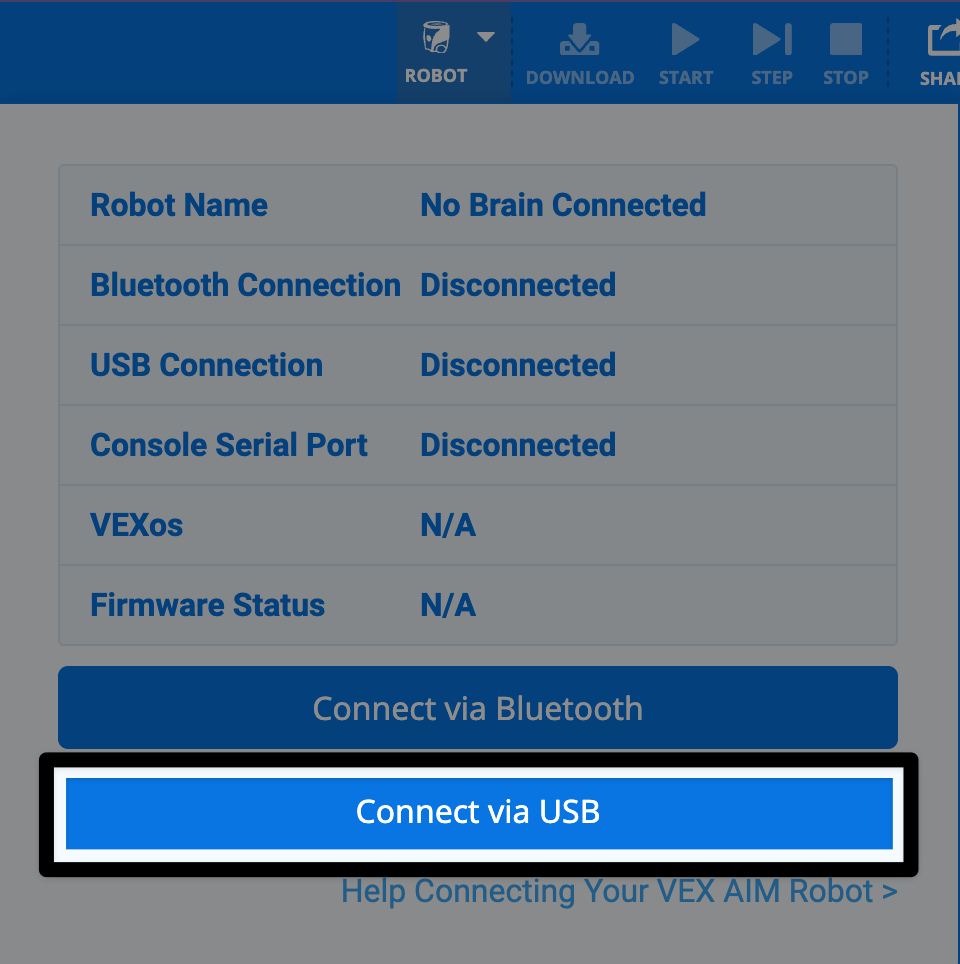
Screenshot of the Robot icon dialog box open, with the Connect via USB button on the bottom highlighted.

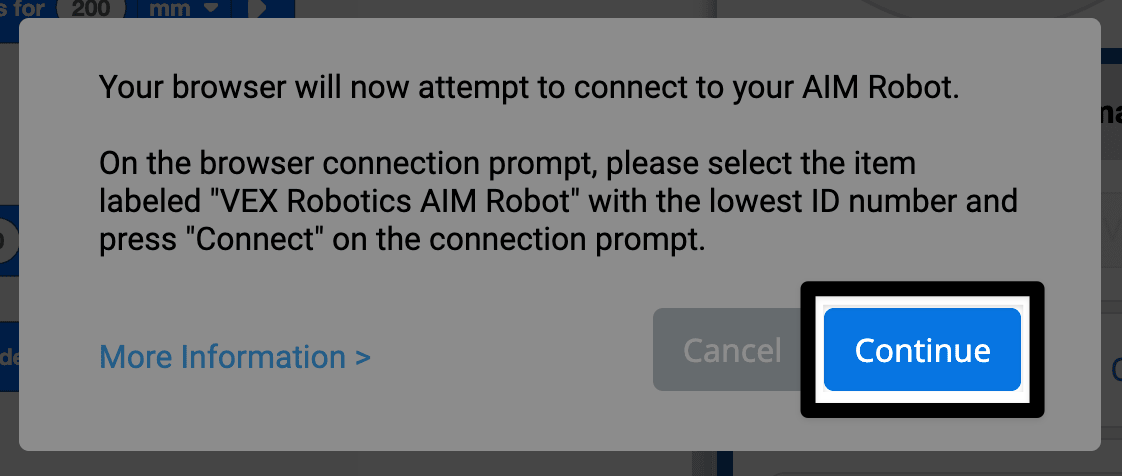
Follow the device prompts#

Screenshot of the connection prompt reads Your browser will now attempt to connect to your AIM Robot. Instructions say to select the item labeled "VEX Robotics AIM Robot" with the lowest ID number, and then press Connect when prompted. The continue button in the lower right corner is highlighted.

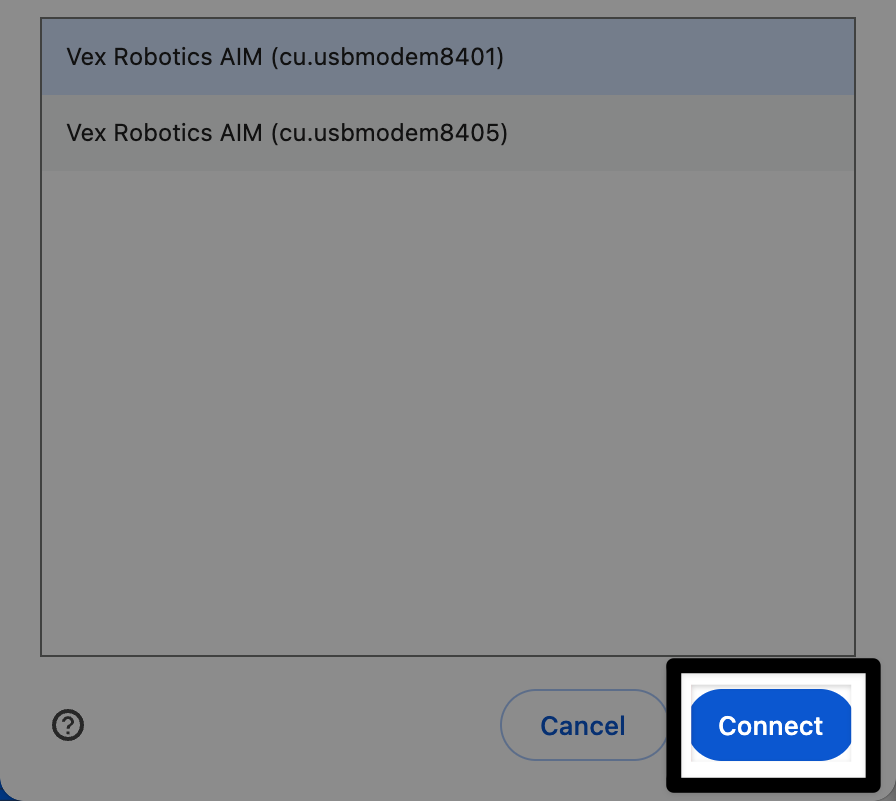
Pick the right connection option#

Select the robot with the LOWEST ID number from the list of robots available.
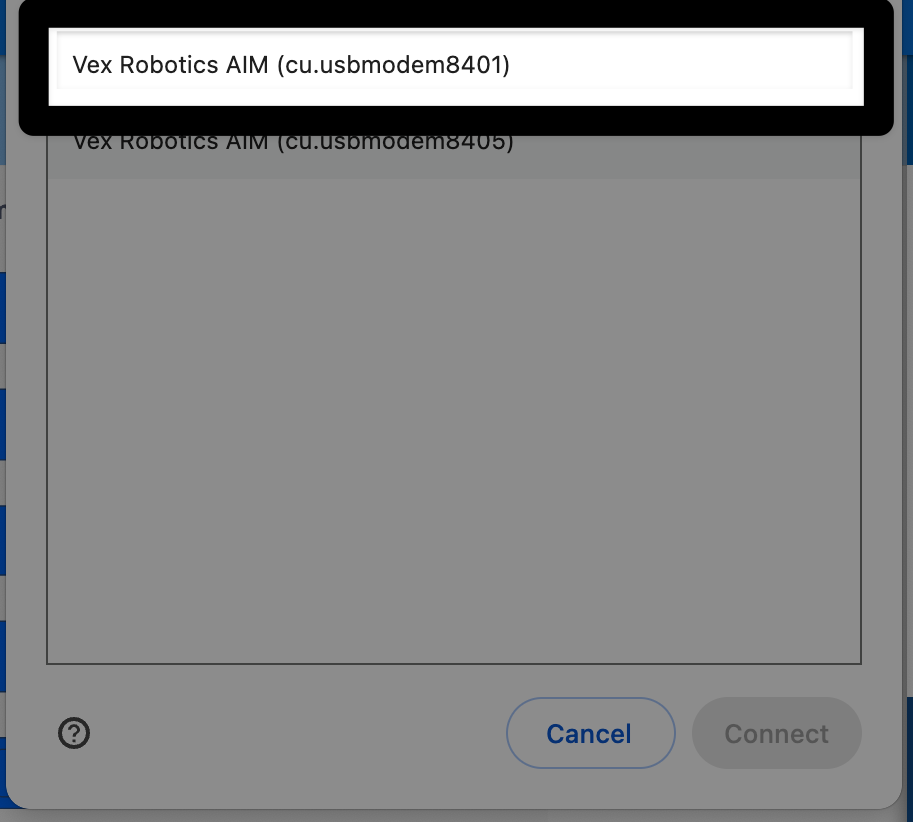
Screenshot of the next prompt, reads Select the robot with the LOWEST ID number from the list of robots available. The lowest id number is first in the list and highlighted.

Finalize your connections#

Same image as the one previous, with the Connect button in the lower right corner highlighted.

You are connected#

The Robot icon in the upper right corner of VEXcode AIM will now appear green.
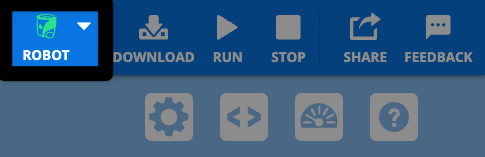
Same screenshot of the upper right corner of the VEXcode AIM Toolbar as earlier, this time with a green Robot icon.

προηγούμενο

Σύνδεση με ενσύρματη σύνδεση (Εφαρμογή)

επόμενο

Σύνδεση με ενσύρματη σύνδεση (Windows)

On this page
  • Plug in the cable
  • Select the Robot icon in the top-right corner
  • Select Connect via USB from the menu
  • Follow the device prompts
  • Pick the right connection option
  • Finalize your connections
  • You are connected
Innovation First, International

Τα VEX και VEX Robotics είναι εμπορικά σήματα ή σήματα υπηρεσιών της Innovation First, Inc. Πνευματικά δικαιώματα ©2026. Με επιφύλαξη παντός δικαιώματος. Η VEX Robotics, Inc. είναι θυγατρική της Innovation First International, Inc. Όλα τα άλλα ονόματα προϊόντων/σήματα τρίτων αποτελούν ιδιοκτησία των αντίστοιχων κατόχων τους. Διπλώματα ευρεσιτεχνίας ή/και Διπλώματα ευρεσιτεχνίας σε εκκρεμότητα - innovationfirst.com/patents
Πολιτική απορρήτου ιστότοπου / Όροι χρήσης ιστότοπου / Πολιτική για τα cookie / Πολιτική απορρήτου λογισμικού

Επισκεφθείτε τη σελίδα VEX Robotics στο Facebook Επισκεφθείτε τη σελίδα VEX Robotics στο Twitter Επισκεφθείτε τη σελίδα VEX Robotics στο Instagram Επισκεφθείτε τη σελίδα VEX Robotics στο YouTube
Φόρμα σχολίων VEX API

Εκτιμούμε τα σχόλιά σας! Χρησιμοποιήστε αυτήν τη φόρμα για να μοιραστείτε προτάσεις, σχόλια ή να αναφέρετε σφάλματα με το VEX API. Η συμβολή σας μας βοηθά να βελτιώσουμε την τεκμηρίωση του VEX API.

Εάν αντιμετωπίζετε τεχνικά προβλήματα ή χρειάζεστε υποστήριξη πελατών, επισκεφθείτε τη διεύθυνση support.vex.com.

  • Send Happy Feedback
  • Send Sad Feedback

Σημείωση: η τρέχουσα διεύθυνση URL θα κοινοποιηθεί στο μήνυμά σας

Συμπεριλαμβάνοντας τη διεύθυνση ηλεκτρονικού ταχυδρομείου σας, συμφωνείτε ότι η VEX μπορεί να σας στέλνει ηλεκτρονικά μηνύματα εάν έχουμε ερωτήσεις σχετικά με τα σχόλιά σας.
Πολιτική Απορρήτου >
Παρακαλώ δώστε τα σχόλιά σας. Τα σχόλια υποβλήθηκαν με επιτυχία!
Choose Which VEX IQ Generation to View

VEX IQ (1st gen)

VEX IQ (2nd gen)