Apertura de un proyecto#

Opening a Project

This tutorial walks you through opening a saved project in VEXcode IQ (2nd gen). By the end, you’ll have your project loaded and ready to work on.

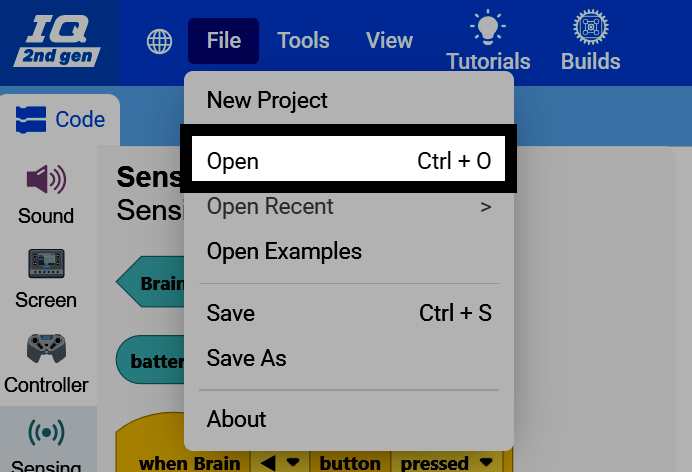
  1. Select File in the top-left of VEXcode, then select Open.

Captura de pantalla de la barra de herramientas de VEXcode IQ (2.ª generación), con el menú Archivo resaltado. Captura de pantalla del menú Archivo abierto, con la opción Abrir resaltada.
  1. Navigate to and select the project file that you want to open.
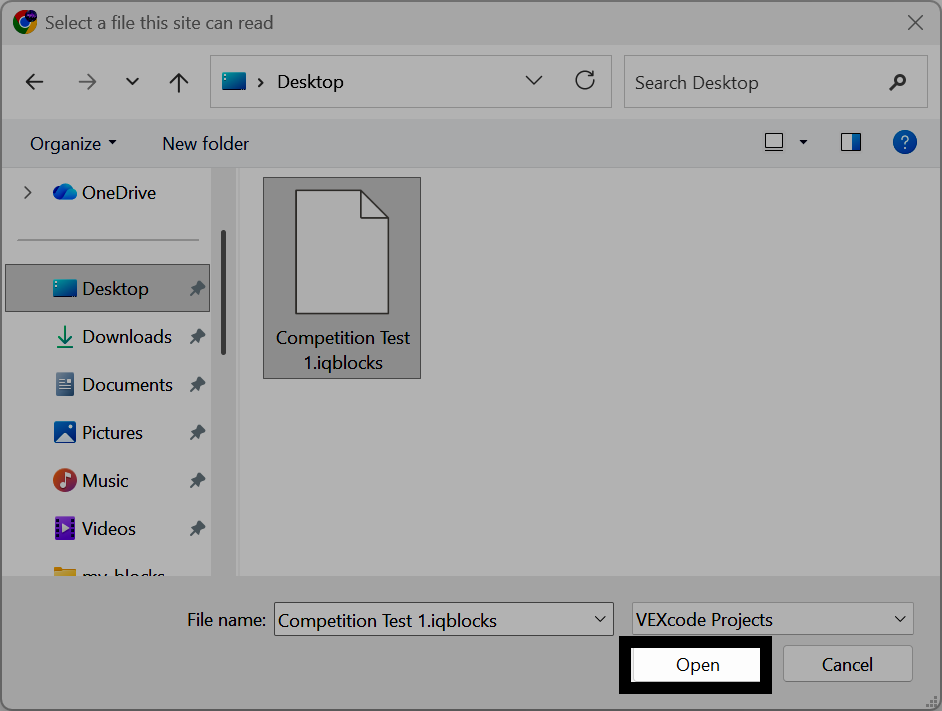
Captura de pantalla del selector de archivos de Windows, con un archivo de proyecto seleccionado y el botón Abrir resaltado.
  1. The project name at the top of VEXcode will change to show the name of the file you just opened, and VEXcode will start auto-saving your project.
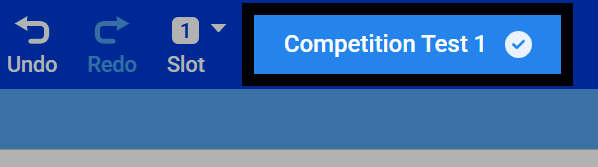
Captura de pantalla de la barra de herramientas de VEXcode IQ (2.ª generación), que muestra el nombre del proyecto abierto con un icono de marca de verificación.